SAMPLE DISCOVERY & PROGRESSION WORKSTATION
SAMPLE-01

Turn your recording collection into new musical ideas.

Discover hidden passages, explore sample-based chord progressions, randomize combinations and create editable loops in just a few clicks.

STANDALONE MACOS APPIN DEVELOPMENTLOCAL AUDIO
SAMPLE-01 app iconMADE FOR MACOS
THE WORKSPACE / 01

Find it. Recombine it. Make it yours.

Passage discovery, sample progressions, controlled randomization and a multi-clip editor, connected in one creative workspace.

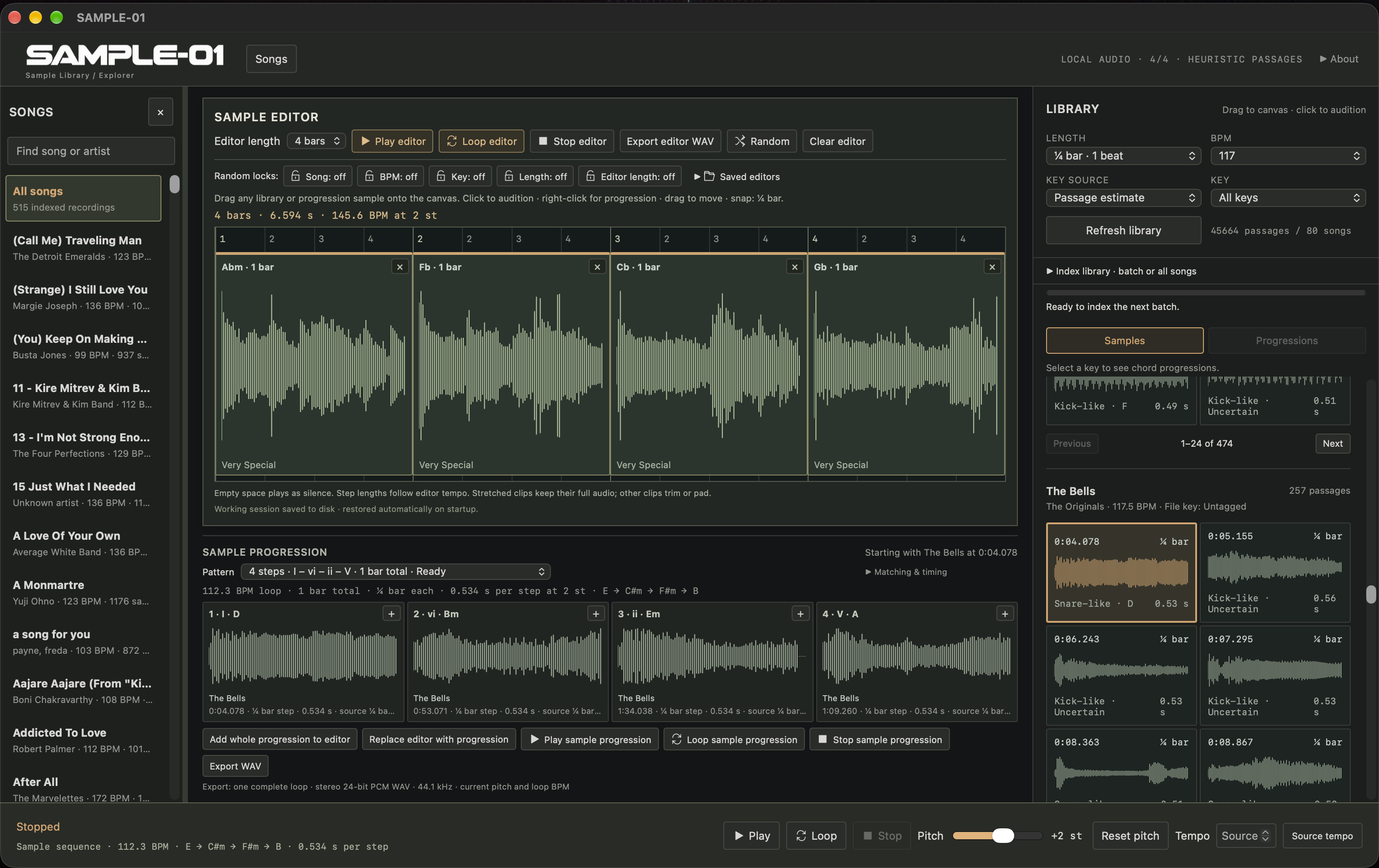
SAMPLE-01 development build showing a recording library, a four-bar multi-clip editor with Random and parameter locks, sample progression patterns and candidate passages.
SAMPLE-01 / DEVELOPMENT BUILDView full-size screenshot (opens in a new tab)

Actual app screenshot. Controls and layout may change before release.

A large collection. A faster way in.

Designed for large sample collections, SAMPLE-01 helps you turn hundreds of complete recordings into an auditionable musical idea without loading individual tracks into your DAW and assembling every clip by hand. The same workflow works with smaller collections, too.

MUSICAL EXPLORATION / 02

Give your samples a new direction.

Explore harmonic patterns and unexpected combinations, then shape the result into a loop you can use.

SAMPLE PROGRESSIONS

Build an idea around a progression.

Choose a key and a musical pattern. SAMPLE-01 suggests candidate audio passages for its harmonic steps, ready to audition together or loop as a sequence.

EXAMPLE FOUR-STEP PATTERN
  1. i
  2. VI
  3. III
  4. VII

Send the whole progression to the editor or use it to replace the current arrangement. Refine the clips, adjust pitch and timing, then export a WAV.

Explore sample progressions
CONTROLLED RANDOMIZATION

Keep what works. Try what’s next.

Use Random to explore new selections while preserving the musical parameters you choose. Independent locks let you decide what stays fixed as you experiment.

FIVE INDEPENDENT LOCKS
  • Song
  • BPM
  • Key
  • Length
  • Editor length

Hold onto the key or tempo, keep your editor length, or leave more parameters open to discover a different combination.

Learn the random controls

Musical matching uses estimates: a passage’s estimated key does not guarantee that it contains the chord implied by a progression step. Audition the suggestions and let your ears guide the result.

THE CREATIVE WORKFLOW / 03

From a collection to a new idea.

Move from complete recordings to an editable musical sequence in a few clicks, then carry the result into your DAW.

01 / DISCOVER

Open your collection

Index your recordings and discover candidate passages across the library. Start with a large archive or a small selection.

02 / PROGRESSION

Choose a direction

Select a key and a progression pattern to explore suggested passages for each harmonic step.

03 / AUDITION

Hear it together

Play or loop the proposed sample progression to hear how the passages work as a musical idea.

04 / EXPERIMENT

Make it your own

Transfer the progression to the editor. Try Random with your chosen locks, then refine the clips, pitch and timing.

05 / EXPORT

Take the idea further

Export your working sequence as a WAV and continue producing in your DAW.

RELEASE STATUS / 04

A new starting point for your next track.

SAMPLE-01 is a standalone sample discovery and progression-building workstation for macOS. It is under active development; a purchase link will appear when the app is ready to release.

PLANNED RELEASE PRICE$14.99 USD IN DEVELOPMENTMAC APP STORE / PLANNED
DOCUMENTATION

Go deeper into the creative workflow.

Open the SAMPLE-01 manual